
CONVERT IMAP TO POP IN MAC MAIL OSX
Helpful Hint!
Before you start you will need to have the password for your mail box which can be reset via your control panel if you do not know it! We keep your passwords encrypted for safety.Customers should note when moving from IMAP-POP any mail stored in IMAP folders will not be accessible via your mail client when your POP account is setup. Any mail in IMAP folders will need copied into your inbox.
A Removing Your IMAP Account
Before you can configure Macmail to
POP you will need to remove your IMAP email account
Highlight the mailbox you wish to back up select Settings >EDIT

Select the Account to be removed and click -

Confirm you wish to remove the account by clicking Remove
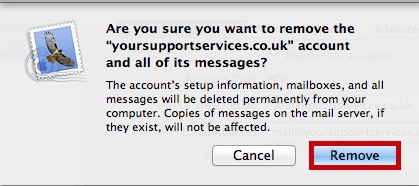
Close the Accounts Window
B Adding Your POP Account
Use this section to add your POP email account.
Choose Add Account from the File Menu

Complete the details on the wizard that loads up, and click Continue
| Full Name : | Your Name |
| E-Mail Address : | your.name@domain.com |
| Password: | This is the password you associated with your mailbox in the control panel |

Complete the incoming server Settings and click Continue
Incoming Server Information |
|
|---|---|
| Account Type : | pop |
| Description : | An Identifier for that account |
| Incoming Mail Server : | pop.iomartmail.com |
| User Name : | Your email address or the username configured in your CP. |
| Password : | This is the password you associated with your mailbox in the control panel |

Complete the Outgoing Server Information and click Continue
Outgoing Server Information |
|
|---|---|
| Description : | An Identifier for that account |
| Outgoing Mail Server : | smtp.iomartmail.com |
| Use Authentication : | Yes |
| User Name : | Your email address or the username configured in your CP. |
| Password : | This is the password you associated with your mailbox in the control panel |

You will then be presented with a summary screen, click Create
Still having trouble sending mail? You may need to change your SMTP Port - info on how to do this can be found Here